Values and Qualifiers
Most FHIR-to-OMOP translations are one-to-one: one source code → one standard concept → one CDM column. Some pre-coordinated codes encode multiple clinical ideas in a single code. When they map to OMOP, they produce a primary concept and one or more qualifier concepts that populate value_as_concept_id (or qualifier_concept_id).
These split mappings are resolved via $lookup — specifically the Maps to value relationship property.
Example: ICD-10-CM O36.111
ICD-10-CM O36.111 ("Maternal care for Anti-A sensitization, first trimester") encodes three distinct clinical facts at once: the type of care, the trimester, and the specific condition. The OMOP vocabularies split it accordingly.
Step 1 — Translate to the source concept
curl 'https://echidna.fhir.org/r4/ConceptMap/$translate?system=http://hl7.org/fhir/sid/icd-10-cm&code=O36.111&targetsystem=https://fhir-terminology.ohdsi.org'
Returns concept_id 10067 with relationship equivalent:
{
  "resourceType": "Parameters",
  "parameter": [
    { "name": "result", "valueBoolean": true },
    {
      "name": "match",
      "part": [
        { "name": "equivalence", "valueCode": "equivalent" },
        { "name": "concept", "valueCoding": {
            "code": "10067",
            "system": "https://fhir-terminology.ohdsi.org",
            "version": "20260227"
          }
        }
      ]
    }
  ]
}
Step 2 — Look up the relationship targets
Request the primary Maps to target, plus domain-id:
curl 'https://echidna.fhir.org/r4/CodeSystem/$lookup?system=https://fhir-terminology.ohdsi.org&code=10067&property=Maps+to&property=domain-id'
{
  "resourceType": "Parameters",
  "parameter": [
    { "name": "code",    "valueCode":   "10067" },
    { "name": "display", "valueString": "Maternal care for Anti-A sensitization, first trimester" },
    {
      "name": "property",
      "part": [
        { "name": "code",  "valueCode": "domain-id" },
        { "name": "value", "valueCode": "Observation" }
      ]
    },
    {
      "name": "property",
      "part": [
        { "name": "code",  "valueCode": "Maps to" },
        { "name": "value", "valueCoding": { "code": "4173786" } }
      ]
    }
  ]
}
Then request Maps to value:
curl 'https://echidna.fhir.org/r4/CodeSystem/$lookup?system=https://fhir-terminology.ohdsi.org&code=10067&property=Maps+to+value'
{
  "resourceType": "Parameters",
  "parameter": [
    { "name": "code",    "valueCode":   "10067" },
    { "name": "display", "valueString": "Maternal care for Anti-A sensitization, first trimester" },
    {
      "name": "property",
      "part": [
        { "name": "code",  "valueCode": "Maps to value" },
        { "name": "value", "valueCoding": { "code": "4239938" } }
      ]
    },
    {
      "name": "property",
      "part": [
        { "name": "code",  "valueCode": "Maps to value" },
        { "name": "value", "valueCoding": { "code": "45757214" } }
      ]
    }
  ]
}
Together, these calls return three relationship targets — one Maps to and two Maps to value (paid plans can request all three properties in a single call).
The Echidna Browser shows the split at a glance — one Maps to and two Maps to value arrows from the same source concept:
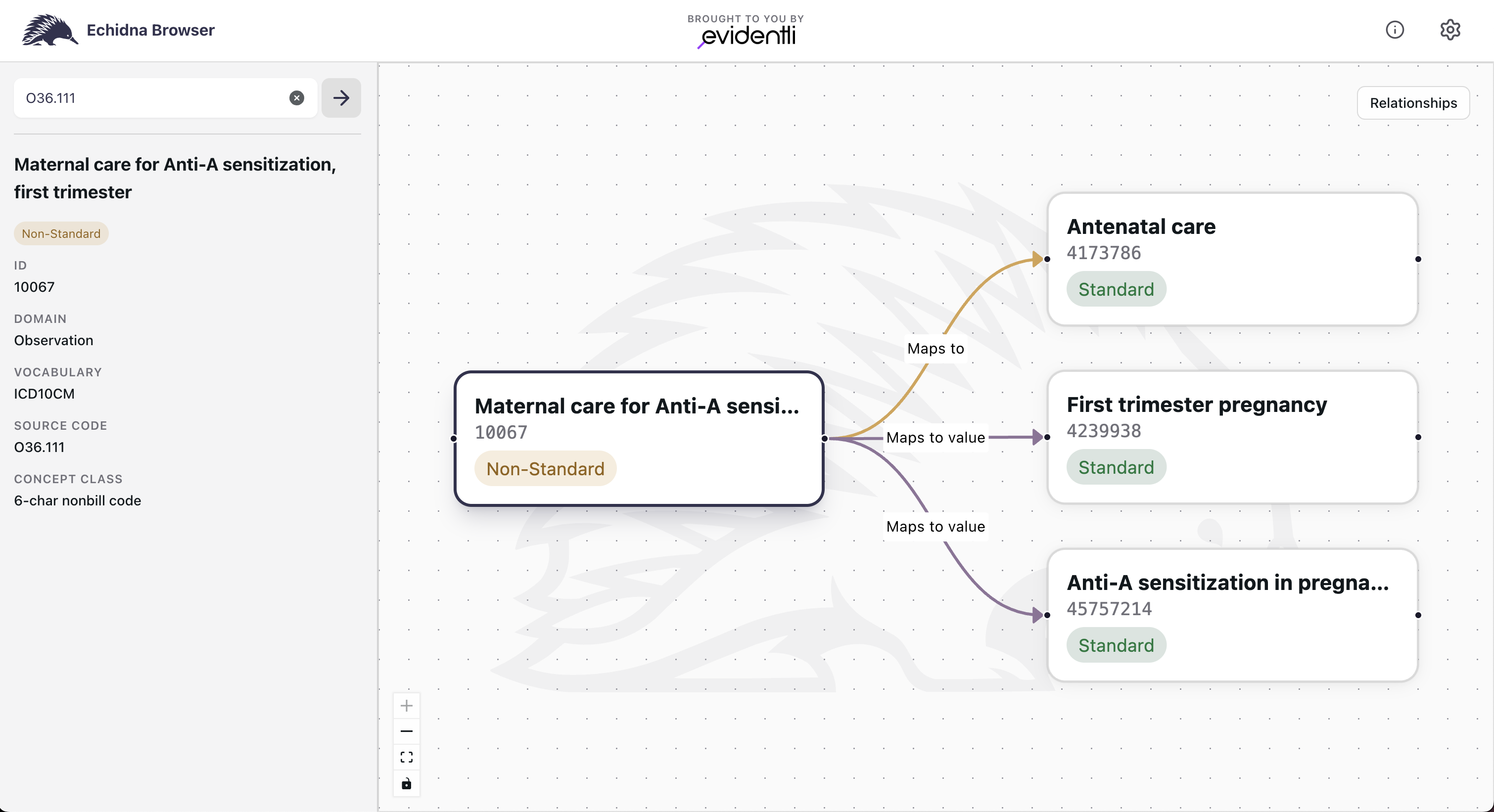
How the targets map to CDM columns
| Relationship | concept_id | Concept name | Domain | CDM column |
|---|---|---|---|---|
Maps to | 4173786 | Antenatal care | Observation | observation.observation_concept_id |
Maps to value | 4239938 | First trimester pregnancy | Condition | observation.value_as_concept_id |
Maps to value | 45757214 | Anti-A sensitization in pregnancy | Condition | observation.value_as_concept_id |
The source concept_id (10067) goes into observation.observation_source_concept_id.
When multiple Maps to value targets are present, the StructureMap determines the exact column assignment. The OMOP CDM's observation table has both value_as_concept_id and qualifier_concept_id; check the IG StructureMap for which concept gets which.
How to detect split mappings
Any source concept that has a Maps to value property in $lookup is a split mapping. There is no need to pre-screen — simply request both Maps to and Maps to value properties and handle the presence or absence of Maps to value accordingly.
When a split isn't really a split
A source concept with multiple Maps to value targets is a genuine split when the source code pre-coordinates distinct clinical facts — the O36.111 example above, where care type, trimester, and condition are all really present in the one code. In that case the split is expected, and the StructureMap assigns each target to its column.
Occasionally a source concept instead resolves to more than one Standard concept in the same domain via Maps to (not Maps to value). That is usually not a clinical split at all — it is a vocabulary-content condition: a single source code that has no single unambiguous Standard target in the loaded release. Because OMOP intends exactly one Standard concept per clinical idea per domain, this is something to report, not to resolve in ETL.
How to tell them apart
| Signal | Interpretation | Action |
|---|---|---|
One Maps to plus one or more Maps to value | Legitimate split — the code pre-coordinates a primary concept and its qualifier(s) | Handle in the StructureMap (this page) |
Two or more Maps to targets in the same domain | Vocabulary-content anomaly — no single Standard target | Report to the OHDSI Vocabulary WG; do not hard-code a pick |
No Maps to and standard-concept = NS | No Standard mapping in this release | Write _concept_id = 0, preserve source values |
Rule of thumb: multiple Maps to value targets are a mapping concern and belong in the StructureMap. Multiple Maps to targets in one domain are a vocabulary concern and belong in a report to the Vocabulary Working Group. Compensating for the latter inside ETL breaks the cross-site comparability the CDM is built to guarantee.
OHDSI/Vocabulary-v5.0 on GitHub, using the Community Contribution templates. Capturing the source system URI, the source code, and the concepts the server returned at transform time gives the WG what it needs for a timely fix that then flows back through a routine vocabulary refresh. The IG describes this pathway in full under Reporting Vocabulary Anomalies to the OHDSI Vocabulary Working Group.